


If Account Health flags dozens of listings with GPSR issues, you can now fix them with a single file. From the side panel of one issue you generate an Excel template holding every open request for that issue in the store, fill it in offline and upload it with your product documents. One template takes up to 5,000 rows, and the work is done store by store. The data Amazon asks for comes from Regulation (EU) 2023/988 on general product safety, the GPSR, which has applied since 13 December 2024. Amazon asks for the manufacturer's contact details, the responsible person in the EU, and warning and safety information.
Amazon announced the feature in the seller forum, in Italian, on 17 November 2026. You track the status of each request in the same side panel, and if it is rejected Amazon shows the reason and what to fix. Upload the template as it is, without changing its format or column headers.
What the GPSR requires from an online listing
Article 19 of the regulation says that anyone selling online must show in the offer, clearly and visibly, at least the following:
- Manufacturer. Name, registered trade name or registered trade mark, with a postal and electronic address.
- Responsible person. If the manufacturer is not established in the EU, the name, postal and electronic address of the operator who answers for the product in the EU.
- Product identification. A picture, the type and any other product identifier.
- Warnings and safety information. Whatever has to go on the product, the packaging or accompanying documents, in a language consumers in the country of sale can easily understand.
Under the regulation, the manufacturer is whoever makes a product, or has it designed or made, and markets it under their own name or trade mark. A European brand that has its products made in China and sells them under its own mark is therefore the manufacturer. Article 16 bars a product from the market unless an economic operator established in the EU answers for it. Under the Market Surveillance Regulation, that can be a manufacturer established in the EU, an importer, an authorised representative with a written mandate or, when no other operator exists, a fulfilment service provider established in the EU.
Penalties are set by each Member State and, under Article 44, must be effective, proportionate and dissuasive. On Amazon the practical effect is a listing at risk of removal, as the dashboard shows.
How the issues show up in Account Health
On the Account Health dashboard, the policy compliance page lists open issues. Amazon's help pages call this the regulatory compliance section. In the Reason column, GPSR issues appear like this, one row for each missing piece of data:
- GPSR · warning and safety information
- GPSR · manufacturer contact details
- GPSR · Responsible Person contact details
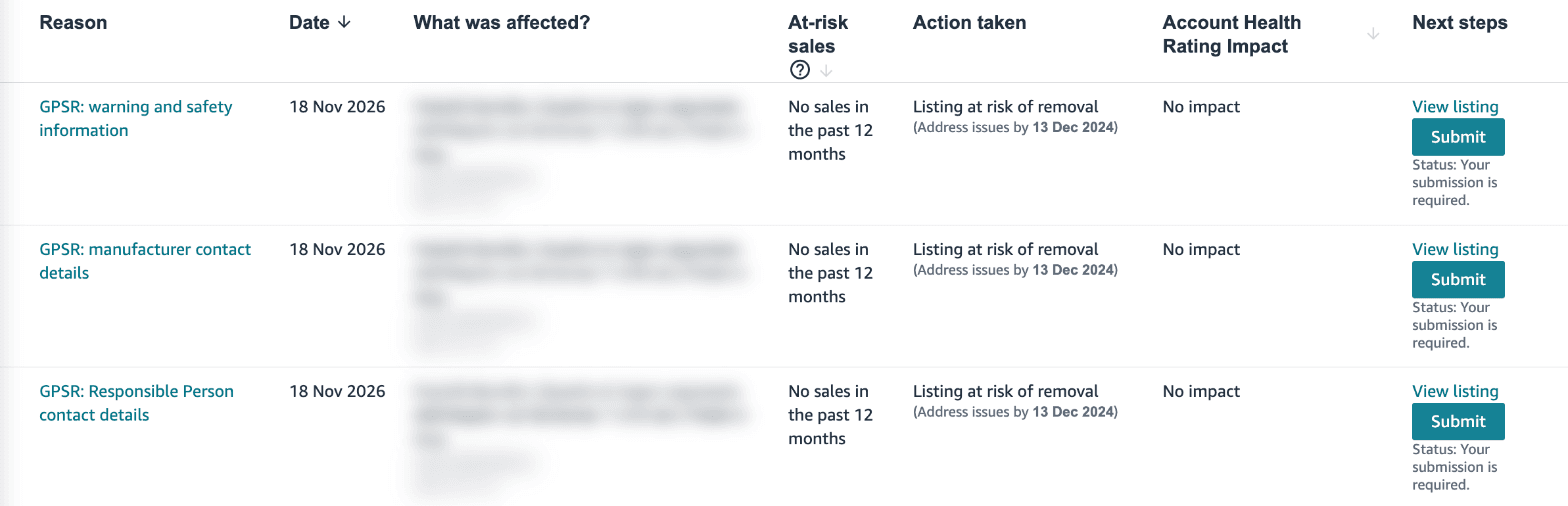
The Action taken column reads Listing at risk of removal, with an address-by date of 13 December 2024, the day the regulation started to apply. It shows up on rows opened on 18 November 2026 as well, so there is no point waiting for advance notice. The Account Health Rating Impact column says No impact, but a removed listing stops selling all the same. For the rest of the dashboard, see our guide to avoiding account suspension.
How bulk upload works
Click Submit in the Next steps column of a GPSR row. In the side panel, choose Bulk upload. The other two routes are Single product upload, handy with a few SKUs, and Submit Appeal, for a request you think was raised in error. Bulk upload takes four steps:
- Generate the template. The Generate a template to upload information in bulk button prepares the file, which can take a few minutes.
- Download it. Download template gives you an .xlsx file with every open request for that issue, in your account and for that store.
- Fill it in. Follow the Instructions sheet inside the file, leaving the format and headers alone.
- Upload it. Under Upload updated template, add the file, then the PDFs if you chose to send documents, and click Submit.
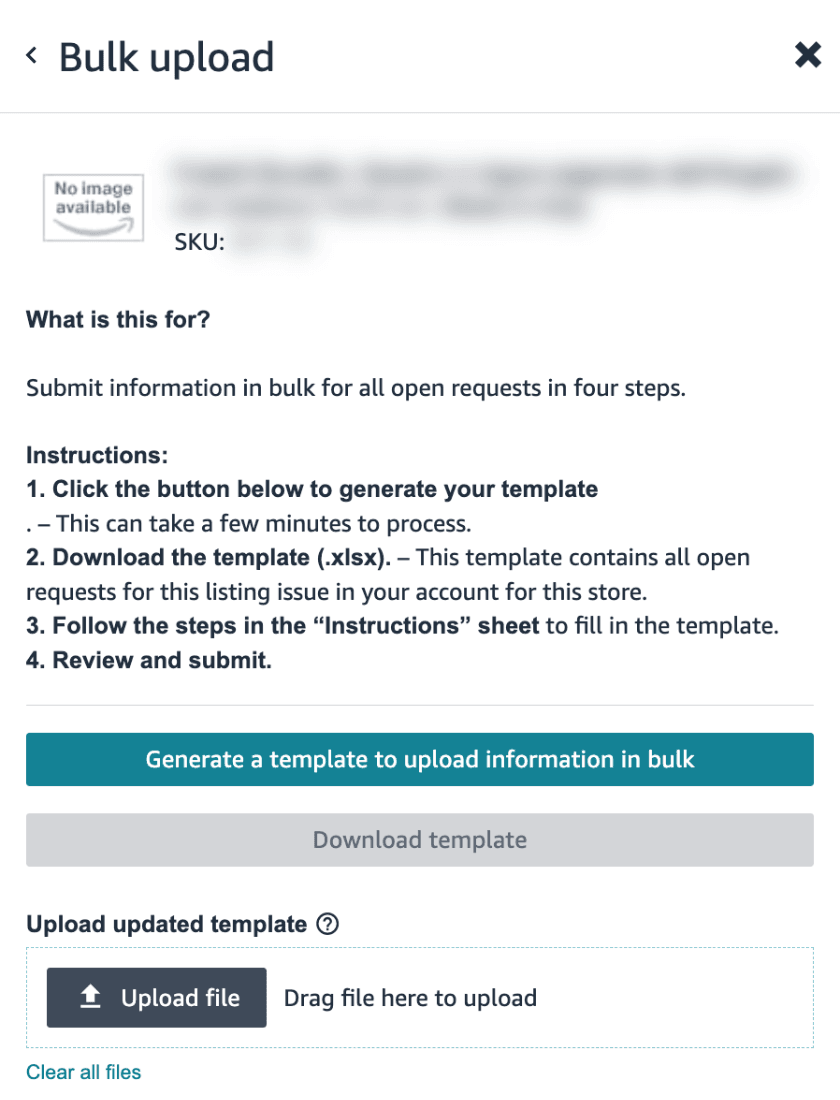
According to Amazon's help page on GPSR information, a template holds up to 5,000 records, the SKU you started from plus up to 4,999 others. If the Open tab shows more than 5,000 GPSR issues, repeat the process. If the upload returns errors, start again from generating the template until they are all fixed. Each file covers one issue in one store, so if you sell in Italy, Germany, France and Spain you need a template for each reason and each store.
For manufacturer and responsible person details there is a shorter route. If the data is the same across the whole brand, you can submit it once for the brand from the compliance box near the top of the page, and the store selector at the top of the side panel copies it to the stores you pick. If you have already sent it that way, Amazon says there is nothing more to do. Your brand needs to be in Brand Registry, which Amazon also asks of authorised resellers.
What to check before filling in the template
The help page and the panel set out a few format rules worth checking before you upload:
- Phone. International E.164 format, so + and the country code followed by digits only. Spaces, hyphens and brackets get the number rejected, even when it is correct.
- Email. For the responsible person, use the same address you entered in the listing attribute when you created the offer.
- Language. Responsible person details go in one of the EU's official languages. Warnings must be in the store's official language, and images uploaded to the PS01-PS06 slots can be removed if they are unreadable or in the wrong language.
- Documents. A link to a manual or safety sheet must download the PDF directly. A sharing link that opens the file in the browser will not do.
- Safety attestation. Tick it only if the product can be used safely without warnings. If you choose it for a product that needs them, Amazon will not create the new listing.
- Label. What you submit must match what is printed on the product or packaging, because Amazon asks for the manufacturer, responsible person and warnings to appear there too.
If a document is rejected, the dashboard may add a separate row whose reason starts with Document, followed by the content type and Rejected. Amazon warns that you may not be able to replace the file from that row. Upload the new one from the warning and safety information row instead, with Submit.
Who needs to act now
This affects anyone selling non-food consumer products in Amazon's European stores, most of which fall under the GPSR. Bulk upload matters most for long catalogues and multi-country sellers, because it saves opening listings one by one in every store. Issues also land on listings that have not sold for months, like the ones in the screenshot, so before the December peak it is worth checking the Open tab every week.
If you manufacture outside the EU under your own brand, the responsible person has to be an operator established in the EU, such as an importer or an authorised representative. If you are the manufacturer and you are based in the EU, you can name your own company, but you still have to enter it in Seller Central, because Amazon treats manufacturer and responsible person as two separate pieces of data. If you are opening new European stores, get this data ready before launch, along with the rest of the list in our guide to selling on Amazon in Europe.
This is a general overview, not legal advice. Who counts as manufacturer and who as responsible person depends on your supply chain, and in unclear cases you should check with a product safety consultant.
Catalogue compliance is part of our account management work. If you have a lot of listings at risk over GPSR and want them sorted before December, let's talk.