


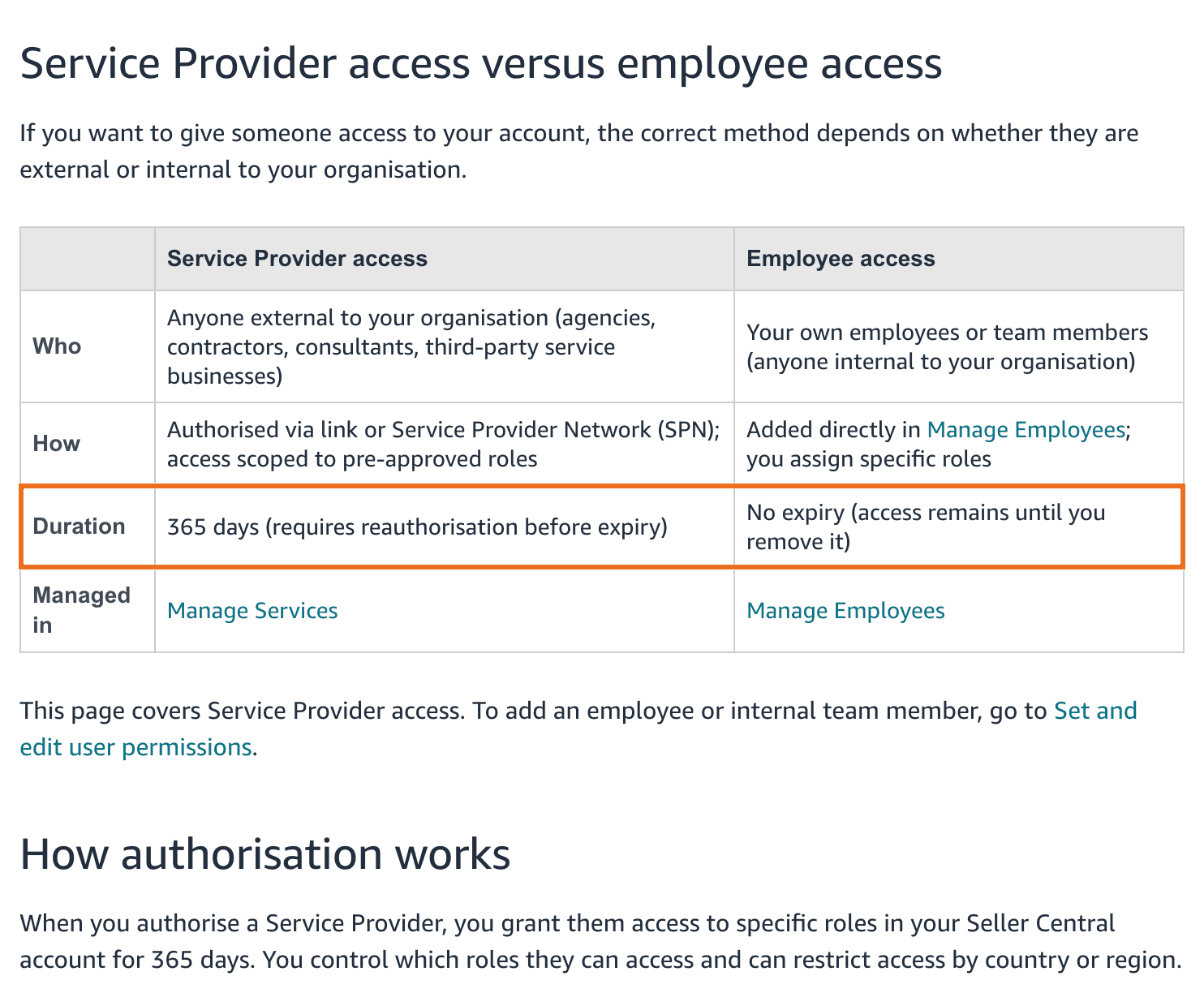
Since 1 September 2026, an agency, freelancer or virtual assistant working on your Seller Central account must complete business verification to get their authorisation renewed. Access lasts 365 days and has to be renewed before it expires, and you decide which roles they can use, country by country if you want. Employees you add as internal users still have no expiry. If a Service Provider's authorisation lapses, they lose access until you authorise them again through the full process.
Amazon announced the change in Seller Central's Seller News on 5 October 2026. The operational rules sit in three help pages, on how to authorise a Service Provider, how to reauthorise their access and how to remove it. According to the announcement, if you haven't received an email from Amazon about renewal, there is nothing to do yet.
Who it affects and who it doesn't
It concerns every brand that lets someone from outside the company work on its account. Amazon's definition covers agencies, consultants, external contractors and any business registered on the Solution Provider Portal that offers services such as advertising management, account optimisation or fulfilment support.
What matters to Amazon is whether the person is external or internal to your organisation. External people should be authorised as Service Providers, through a link they send you or from their listing on the Service Provider Network. Internal people go into Manage Employees with the roles you assign, and their access stays active until you remove it.
On their side, the Service Provider must be registered in the Solution Provider Portal, have completed role selection and have approved roles. If any of these is missing, you can't authorise them. If you work with a freelancer or a virtual assistant, ask whether they have done this before renewal time comes round.
What changes in practice
- Business verification. The Service Provider has to complete it before accessing your account, or their authorisation won't be renewed.
- 365-day duration. Each authorisation lasts a year. Before it expires Amazon sends you an email with instructions and the date by which to renew. It also adds a notice to the action centre on your Seller Central home page, which stays there until you complete the renewal.
- Roles you choose. The authorisation page shows the roles the Service Provider has been approved for based on their service category. You can drop the ones that aren't needed and restrict access by country or region.
- Who confirms. Only the account owner or an account administrator can authorise, reauthorise or remove a Service Provider.
Renew while access is still active
When expiry is approaching and access is still active, go to Manage Services, click Reauthorise on the service you want to renew, review the roles and confirm with Authorise Provider. Access is extended for another 365 days with no interruption. It is also the moment to add any new roles the provider has been approved for in the meantime, or to remove some.
If you let the authorisation lapse, the provider can no longer act on your behalf, and automated processes or integrations they manage may stop working. Reauthorise is then no longer available. You have to go through the full process again, with a new authorisation link from the provider or from their Service Provider Network listing via Authorise Now. If the provider is listed on the network, a service request is created after you confirm, and they have to accept it before access is activated.
For a brand it means the provider can't work on the account until the authorisation is active again. Campaigns stay as they were left and open support cases stall. Put the date of each authorisation in your calendar. If expiry falls close to Black Friday or Prime Day, renew as soon as Amazon offers it rather than waiting for the last day.
What to check today
- Who has access. Manage Services lists your authorised Service Providers, Manage Employees your internal people. If an external collaborator sits among your employees, remember that Amazon expects external people to be authorised as Service Providers.
- Which roles. A provider that only runs your advertising doesn't need every role they are approved for. At renewal, keep the ones they use and limit countries to those they work on.
- Who gets the notices. The renewal email and the action centre notice must reach someone who can confirm, meaning the account owner or an administrator.
- Integrations. If the provider runs tools connected to your account, ask them which ones. That way you know what stops if access expires or you revoke it.
When you remove access
If you switch agency or a provider's work is done, go to Manage Services, find the provider and select Remove next to their name. Removal is immediate and cannot be undone. The provider instantly loses access to all roles and data in your account, and the integrations they managed stop working. Removal does not cancel active service requests or any contracts you have with them outside Seller Central, so the contractual side needs handling separately. If you want them back one day, you have to authorise them again from scratch.
In our guide to choosing an Amazon agency we explain why your selling and advertising accounts should stay in your name even when someone else runs them. User authorisations and roles are part of our account management work.
If you want to tidy up who can access your account and with which roles, let's talk.