

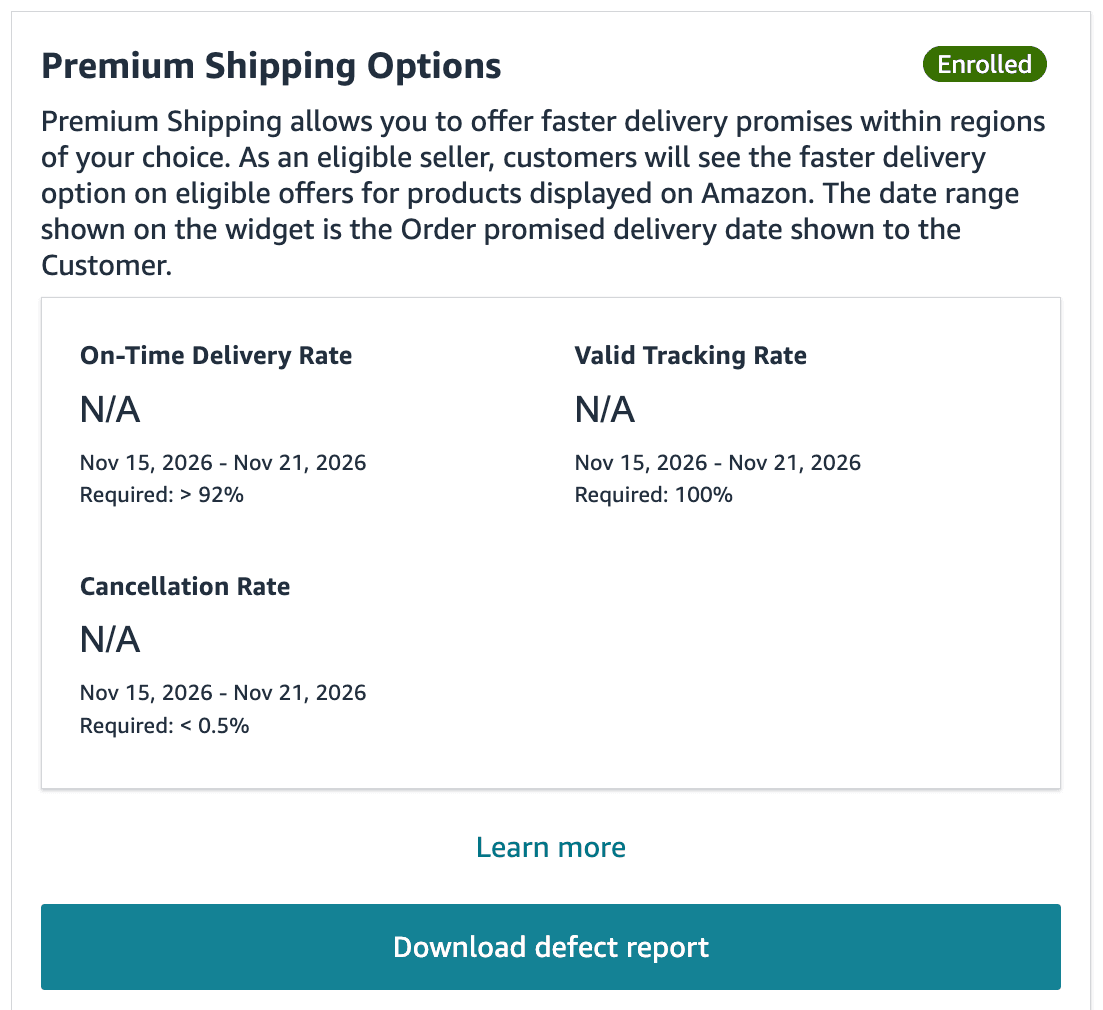
If you fulfil orders yourself and want to offer one-day or two-day delivery on Amazon.co.uk, .de, .fr, .it or .es, you now have to enrol in Premium Shipping options manually. You do it from Account Health, on the Eligibilities tab, with the Enroll button. Sellers who have been active for more than 90 days with at least 10 orders in the past 30 can enrol. Staying in requires an on-time delivery rate of at least 92%, a 100% valid tracking rate and a cancellation rate below 0.5% on Premium Shipping orders. If you are already enrolled, there is nothing to do.
Amazon announced it in the seller forum, in Italian, on 20 November 2026. The stated reason is to have sellers read the programme requirements before promising faster delivery, so they meet the dates shown to customers and protect their account health. After enrolling you still need to update your shipping template, since that is where you choose carrier, regions and transit times.
Who it affects and who it doesn't
The change concerns the orders you fulfil from your own warehouse. If you sell only through FBA, nothing changes, because FBA offers have their own delivery times. Seller Fulfilled Prime is also separate. Its orders are excluded from the Premium Shipping evaluation and follow the rules of their own programme.
It matters for brands that keep part of the catalogue seller-fulfilled, such as bulky items, slow movers or the backup offers that keep selling when FBA stock runs out. On those products, the delivery date on the page weighs on the customer's choice. The Search Query Performance dashboard has columns showing how many clicks and purchases go to products with one-day or two-day delivery, and we use them in our guide to falling sales. If fast delivery wins on a search and you don't offer it, enrolling may be worth the work. To decide what to ship yourself, see our FBA vs FBM guide.
Requirements to get in and thresholds to stay in
Amazon's help page on Premium Shipping and the Premium Shipping FAQ set these conditions:
- Track record. More than 90 days selling on Amazon and at least 10 orders in the past 30 days, across all shipping options.
- Warehouse and handling time. You ship from a domestic warehouse with a zero-day handling time. It cannot be changed, whatever handling time you set on the product, so an order placed before the cut-off time ships the same day.
- Carriers. You need a fully tracked shipping method from an approved carrier. In Italy the list is GLS, TNT, DHL, UPS, BRT, Poste Italiane, DPD, Chronopost and SDA, and each marketplace has its own.
- Thresholds. On-time delivery rate of 92% or higher, valid tracking rate of 100%, seller-initiated cancellation rate below 0.5%. They are measured on Premium Shipping orders only.
The thresholds apply to the trailing 7 days, but carrier data arrives a week late. In practice Amazon looks at the period from 14 to 7 days ago. There are no exemptions, and a carrier without tracking or outside the approved list rules you out of Premium Shipping.
How to enrol
Open Account Health and go to the Eligibilities tab. On the Premium Shipping Options card, confirm that you meet the requirements and click Enroll. If you don't see the card, Amazon says you may not be eligible yet.
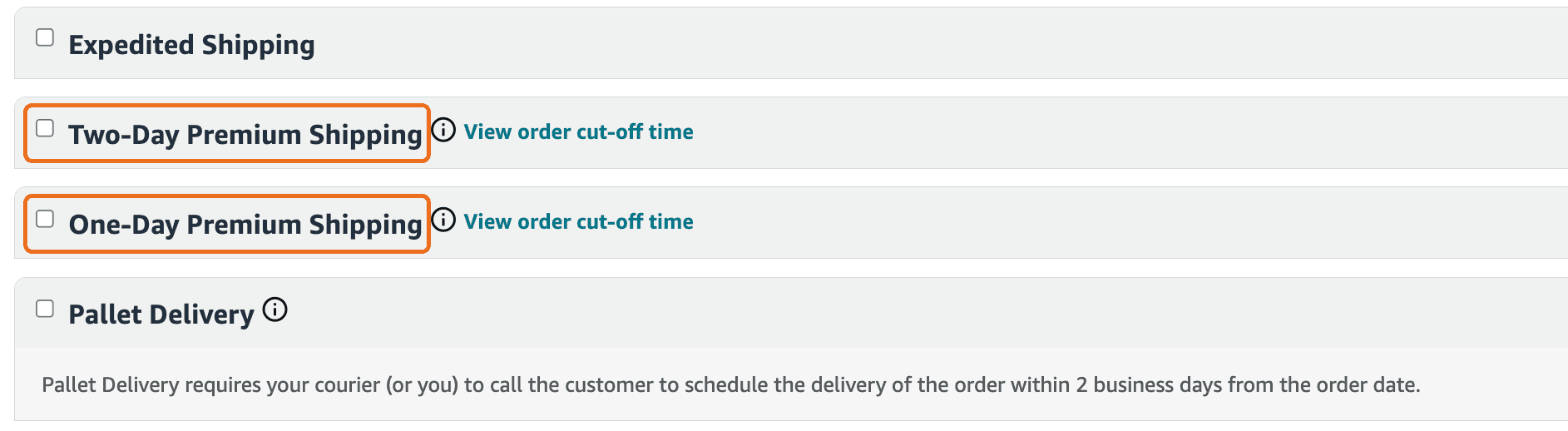
Then go to your shipping settings, open the template you use for the products you want to ship fast and click Edit. Below Standard Shipping you'll find the check boxes for the premium options. For each one, choose carrier and shipping method, then either set transit times manually or let Shipping Settings Automation calculate them. The FAQ also mentions same-day delivery, but the template we opened on an Italian account only showed the one-day and two-day options.
What to check before you click Enroll
With a zero-day handling time, every late order counts against the 92% threshold, and on small volumes a handful of parcels is enough to drop below it. Before you enrol, sort out these points:
- Regions. Only include the areas where your carrier really delivers in one or two days. Islands and remote areas have their own rows, and they are often better left on standard shipping.
- Cut-off time. Set it around your carrier's collection time, in the Locations section of your shipping settings, where each location has its own operating days and order cut-off. If the carrier collects at 4 pm and the cut-off is 6 pm, orders placed in between leave the next day, already late.
- Warehouse priority. In Manage orders, refine the search by selecting Premium under Shipping service levels, so these orders go out first.
- Tracking. With Buy Shipping the tracking number is linked automatically. If you upload numbers yourself, carrier name and shipping method have to be filled in correctly, or Amazon may not be able to validate them.
- Defect report. Download defect report, on the card in the Eligibilities page, gives you the orders that missed a threshold. Amazon's best practices list it among the checks for keeping eligibility.
If a metric falls below its threshold, Amazon revokes your eligibility, your offers lose the premium options and your status on the dashboard changes to not eligible. To get back in, you submit a plan of action with the root cause and a timeline for fixing it. Orders still pending after the cut-off time are a separate case. They get a new estimated delivery date, which Amazon passes on to the customer.
Shipping templates, cut-off times and delivery metrics are part of our account management work. If you fulfil orders yourself and want to know whether your operation can hold one-day or two-day delivery, let's talk.