

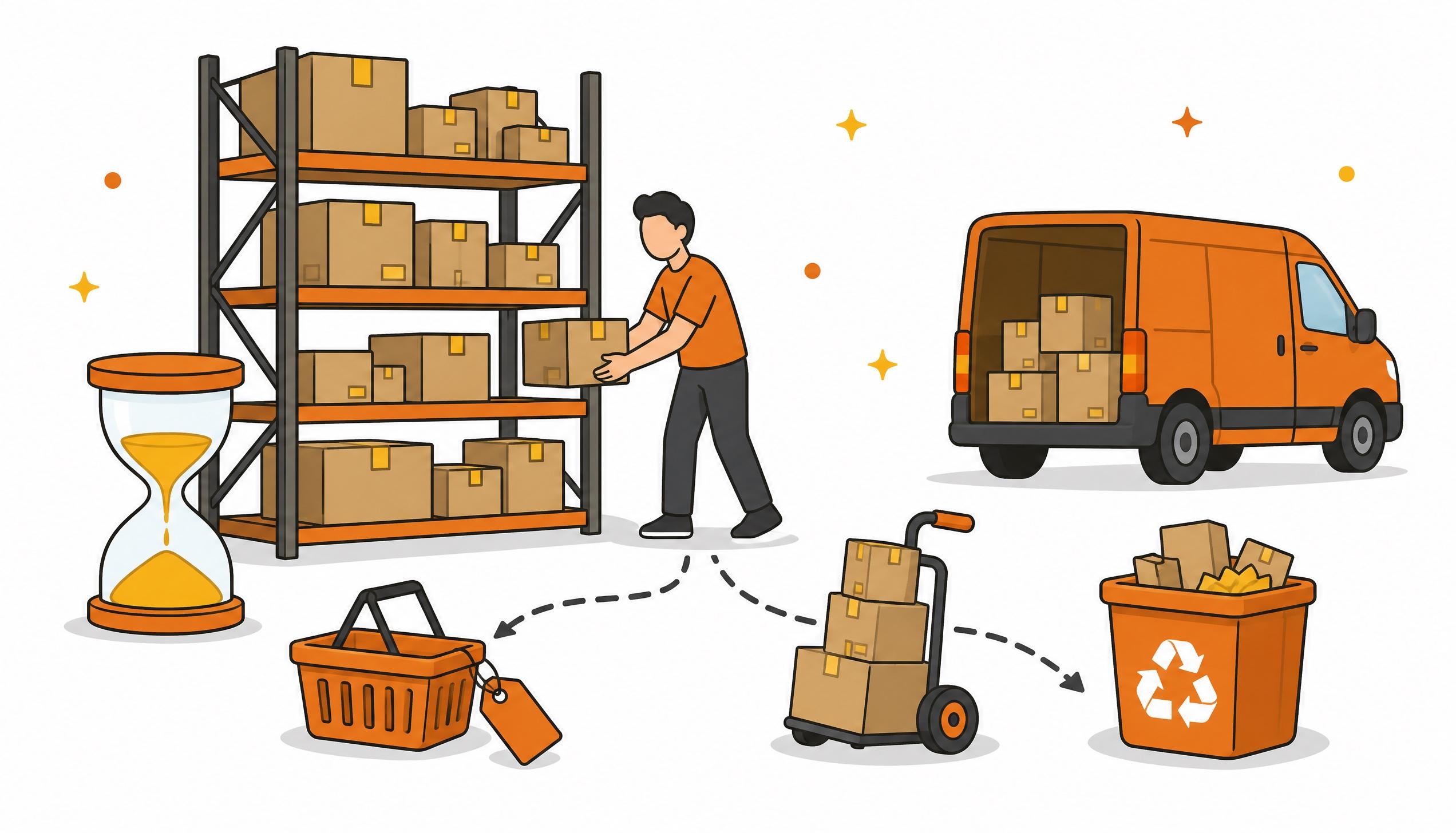
Once you have decided to drop a product, the units still sitting in Amazon's fulfilment centres can be sold at a discount, including through an Amazon Outlet deal, liquidated through Amazon, returned to you or disposed of. In Amazon's own example a €20 product sent to liquidation leaves you €0.86 net, while returning a standard-size item up to 200 g costs €0.50 and disposing of it €0.74. Check the age of the stock before you choose, because from day 241 in storage the aged inventory surcharge is added to your storage fees every month.
Leave what you paid for the goods out of the sums: that money is already spent. What counts is how much you recover from here and what each month of waiting costs you. The fees below come from Seller Central help pages checked in November 2026 and apply to standard-size products stored in Italy, excluding VAT.
Selling at a discount, including Amazon Outlet
If the product still sells, a discount usually recovers more than any other route: you collect the lower price minus the usual fees. Amazon Outlet is the part of the store for overstock and clearance. Outlet deals run for a fixed two weeks and carry no extra fees beyond the referral fee and the fulfilment fee. To submit one you need a Professional selling plan and an ASIN that meets these criteria:
- At least 90 days in Amazon fulfilment centres, with at least one unit available
- New condition and a rating of at least 3 stars, or no reviews yet
- No other promotion running, such as a Lightning Deal, and no Outlet deal in the last 60 days
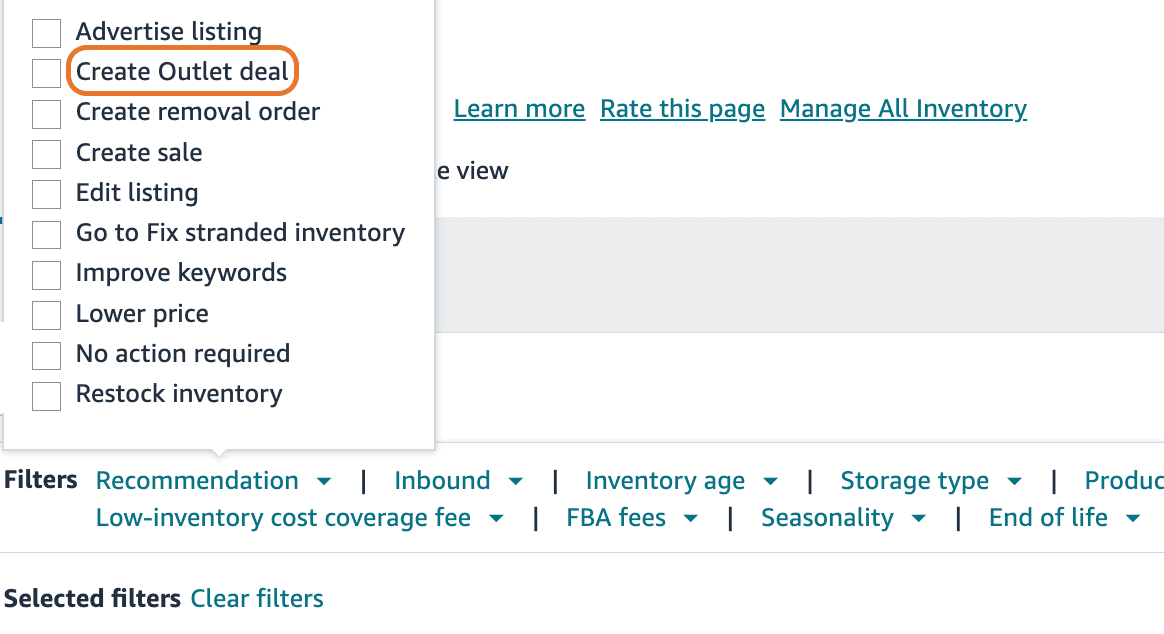
You create the deal from the FBA Inventory page: in the Filters box open the Recommendation dropdown and tick Create Outlet deal to see the eligible products. Then open the dropdown next to the recommended action, on the right of the product, and select Create Outlet deal. Your price cannot exceed a maximum that Amazon works out from the lowest new-condition price for the ASIN. Submissions are processed twice a week and not all of them are approved.
You cannot cap the quantity: once the deal starts, every unit is on sale at that price, so only submit it if you are willing to sell all your stock there. Pause or review automated pricing rules before submitting, because if they stop the price from dropping Amazon cancels the deal without notice. The Outlet discount stacks with the discount of an active coupon on the same product.
If the product is not eligible, you can still cut the price or run a coupon. A lower price also changes how much you can spend on ads: break-even has to be recalculated, as we explain in our article on break-even ACOS.
Liquidating through Amazon
With FBA Liquidations Amazon sells your stock to a wholesale liquidator, who buys it for a fraction of the price. Amazon estimates the value by looking at factors that include your sales history, the product's average FBA selling price and the ASIN's own sales. It tries to find a buyer within 30 days of your request, and the net recovery reaches your account within about 60 days of the shipment being marked as complete. The service covers inventory stored in Italy, France, Germany, Spain, Poland, the Czech Republic and the UK.
From the gross value Amazon deducts a 15% referral fee and a per-item processing fee: for standard-size products it runs from €0.42 up to 200 g to €0.93 between 501 g and 1 kg, and above 1 kg it is €1.02 plus €0.53 per kg. In Amazon's example, a €20 item at a 7.5% liquidator rate is worth €1.50 gross and leaves €0.86 net. The actual rate can vary with the terms agreed with liquidators.
To use it you need a valid VAT number in the country where the inventory is stored and enrolment in Amazon's VAT Calculation Service. Excluded products include dangerous goods, recalled inventory and restricted products. Among unfulfillable units, only those damaged by the customer, the carrier or the distributor qualify. If the product is enrolled in the New Selection Programme, liquidation of the first 200 units is free during the first 120 days.
Getting the stock back or disposing of it
With a return-to-seller order Amazon ships the units to the address you choose. In Italy, returning a standard-size product costs €0.50 up to 200 g, €0.79 up to 500 g, €1.80 up to 1 kg, then €2.32 plus €0.87 for every extra kg. It makes sense when those units have somewhere else to go, such as your own website or a retailer. Factor in the time too: an order can take 10 to 14 working days to leave the fulfilment centre, and more than 30 between October and December.
Disposal costs more than a return: €0.74 up to 200 g, €1.19 up to 500 g, €2.73 up to 1 kg. Amazon donates or recycles what it can, and donations to charities are available only for inventory stored in Italy, France, Spain and the UK. Since 1 May 2026 both fees are charged unit by unit, at the moment each one is removed.
Run the numbers on your product
In the calculator, enter price, weight and number of units, then the discounted price you expect to sell at and the Amazon fees at that price. Liquidation, return and disposal fees are already built in. The starting figures are an example: replace them with yours.
Clearing FBA stock: what you recover per unit
The product
The routes
The price at which you expect to sell every unit, through an Outlet deal or a price cut.
Referral fee plus fulfilment fee. You can find them with the Revenue Calculator in Seller Central.
Share of the price the liquidator pays. 7.5% is Amazon's example: Amazon estimates the real rate from your sales history.
On another channel, after shipping and handling. Leave 0 if you have nowhere to sell it.
You recover the most with: discounted sale
On 100 units: €503.61
On 100 units: €85.50
On 100 units: - €50.00
On 100 units: - €74.00
Rough estimate, Amazon fees excluding VAT. Amazon fees as of November 2026 for standard-size products stored in Italy; for oversize items use Amazon's tables. The discounted sale only counts if the units actually sell: liquidation, return and disposal have a certain outcome, a discount does not. What you paid for the stock is already spent and stays out of the sums.
Every month of waiting costs money
If you leave the stock where it is, you pay two charges. Monthly storage fees for standard-size products are €27.54 per cubic metre from January to September and €52.20 from October to December; apparel, eyewear, shoes, backpacks and handbags pay less. Some sellers also pay the storage utilisation surcharge. From day 241 the aged inventory surcharge is added: €47.99 per cubic metre up to 270 days (some categories, such as apparel and shoes, are excluded) and €125.16 between 271 and 300 days. Beyond 455 days it reaches €261.97 per cubic metre, or €0.25 per unit if that is higher.
Take 100 units in 20 × 15 × 5 cm boxes, 0.15 cubic metres in total. From January to September, storage costs you about €4 a month. If the units are between 271 and 300 days old, the surcharge adds about €19 a month, more than four times as much.
Amazon assesses inventory age on the 15th of each month. To avoid the surcharge, it is enough to have submitted the removal request before that date, even if the removal is not yet complete. An ASIN removed after it already met the surcharge criteria cannot be restocked for eight weeks.
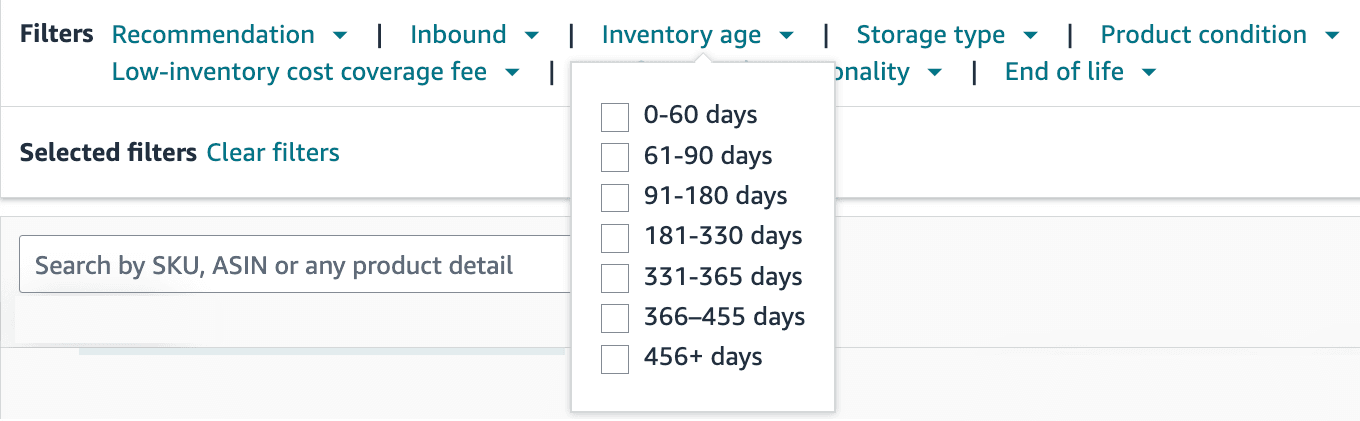
The help page points to a Recommended Removals report, which in the account we checked does not appear among the FBA reports. You can find old units on the FBA Inventory page: the Inventory age filter groups them by age, and a column in the same table shows the estimated aged inventory surcharge for each product.
Before you decide
- Check the recovery rate under Inventory settings on the Manage Excess Inventory page. Amazon uses it to suggest whether to discount or remove, and the default is 30%. If you have no channel to resell the goods, Amazon itself recommends setting it to 0%
- Watch the calendar: as of November 2026 the next inventory age assessments are on 15 November and 15 December, and until the end of the year storage costs almost twice as much
- Try the discount first if the product still has demand and at least 3 stars. Liquidation is the route for what no longer sells: in Amazon's example it leaves you just over 4 cents for every euro of price
This overview is based on Seller Central help pages checked in November 2026, and fees can change. If you have several slow products and want to decide what to keep and what to liquidate with a team that runs Amazon account management every day, let's talk.